Thermometer Gauge
Overview
Thermometer gauge, as you can understand it from its name, indicates a mercurial thermometer. You can place thermometer gauge horizontally, vertically of place several thermometers on your gauge. In addition to the width of your thermometer bar you can configure your thermometer's bulb properties.

Samples: horizontal thermometer, vertical thermometer, multiple thermometers.
Let's create a simple horizontally-oriented thermometer gauge. In order to do so first of all we need to create a linear gauge and set its orientation to "horizontal". The thermometer in fact is a thermometer pointer. So in pointers node you need to create a pointer subnode and set "thermometer" value to type attribute. Full list of thermometer settings you can find in Thermometer Pointer Style Tutorial. And here's our horizontal thermometer gauge:
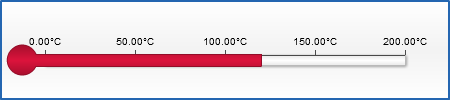
To create a vertically oriented thermometer gauge you simply need to change orientation to "vertical" and adjust the corresponding values for width and height:

Now let's combine some thermometers and create a chart with multiple thermometer gauges.
